Overview
CoinControl is a mobile money management application for tracking personal spending and income. It combines an intuitive record-keeping interface with an analytics dashboard, a fully customisable category system, cloud backup via Firebase, and a built-in calculator as the numeric input pad — so expenses can be logged on the spot without switching apps.
The project was led solo before being joined by collaborators Ken Huang and Issac To. It started as a practical tool for personal use and grew into a fully featured application with an account system, multi-device sync, and extensive personalisation options — including per-category icons and colours, app-wide accent theming, dark and light modes, and support for seven international currencies.
Features
The app is organised around four core feature areas: records, analytics, customisation, and account management. Each was designed to feel native to mobile — minimal taps to log an entry, glanceable charts, and persistent local storage so the app is fully usable offline without an account.
Expenses and income entries are classified by category. Each category has a custom name, icon, and colour. Users can create their own categories from scratch or modify the built-in defaults. A built-in calculator serves as the numeric input pad, enabling on-the-spot arithmetic before logging — useful for splitting bills or converting amounts.
The analytics screen surfaces spending and income trends through a proportion pie chart breaking down entries by category, per-category and total sums, spending goal progress tracking, and highlights for the most frequent and most expensive categories. All figures update immediately as new records are added.
The app offers deep personalisation: custom category icons and names, a 30-colour flat-design palette for category styling and the app-wide accent colour, toggleable light mode, and a choice of seven currency labels (USD, GBP, EUR, HKD, NTD, JPY, KRW) that prefix all displayed amounts.
Daily push notifications remind users to log their expenses. The default firing time is 11:00 PM local time, but users can reschedule the notification to any time that fits their routine via the settings screen.
An optional account system — authenticated via Firebase Authentication — enables cloud storage and backup through Firebase Realtime Database. Data is stored locally regardless of login status. When an account is active, a single-tap sync button reconciles local and cloud data via three selectable strategies: select latest (default), cloud overwrite, or local overwrite.
Implementation
CoinControl is built with React Native for cross-platform iOS and Android support from a single TypeScript codebase. Firebase serves dual roles: Authentication handles account creation and login, while Realtime Database stores the JSON-serialised record and settings payload for each user. Local persistence ensures the app works offline-first — cloud sync is a pull/push operation rather than a live connection.
Technical architecture highlights
- Offline-first local storage — all records and settings persist on-device; no account required for full functionality.
- Firebase Authentication — email/password account creation and session management with no backend server required.
- Firebase Realtime Database — record and settings data serialised to JSON and synced per user UID; three conflict resolution strategies available.
- Built-in calculator engine — numeric input pad doubles as a live calculator, resolving expressions before storing the result as the record amount.
- Custom colour picker — 30 flat-design colours exposed as a reusable component used for both category styling and the global app accent.
| Feature | Technology |
|---|---|
| Cross-platform mobile | React Native (iOS & Android) |
| Language | TypeScript |
| Account authentication | Firebase Authentication |
| Cloud data storage | Firebase Realtime Database |
| Local persistence | AsyncStorage (on-device) |
| Push notifications | React Native Push Notification library |
| Charts | React Native SVG / custom pie renderer |
Design
The UI was designed around a flat design aesthetic — bold colour blocks, clean typography, and no gradients. The 30-colour accent palette was curated from the flat UI colour set, giving the app a distinct look while keeping colour choices visually coherent regardless of what the user picks. Every screen that displays amounts respects the user's selected currency label and applies it consistently.
Customisation options available to users
- Category icon — chosen from a curated icon library displayed in a scrollable grid.
- Category colour — picked from the 30 flat-design colours in the custom colour picker.
- App accent colour — the same 30-colour picker applied globally across buttons, highlights, and charts.
- Light / dark mode — toggled from the settings screen; respects the chosen accent colour in both modes.
- Currency label — seven options (USD, GBP, EUR, HKD, NTD, JPY, KRW) applied as a prefix on all record and summary displays.
- Daily notification time — push notification scheduling customisable to any local time.
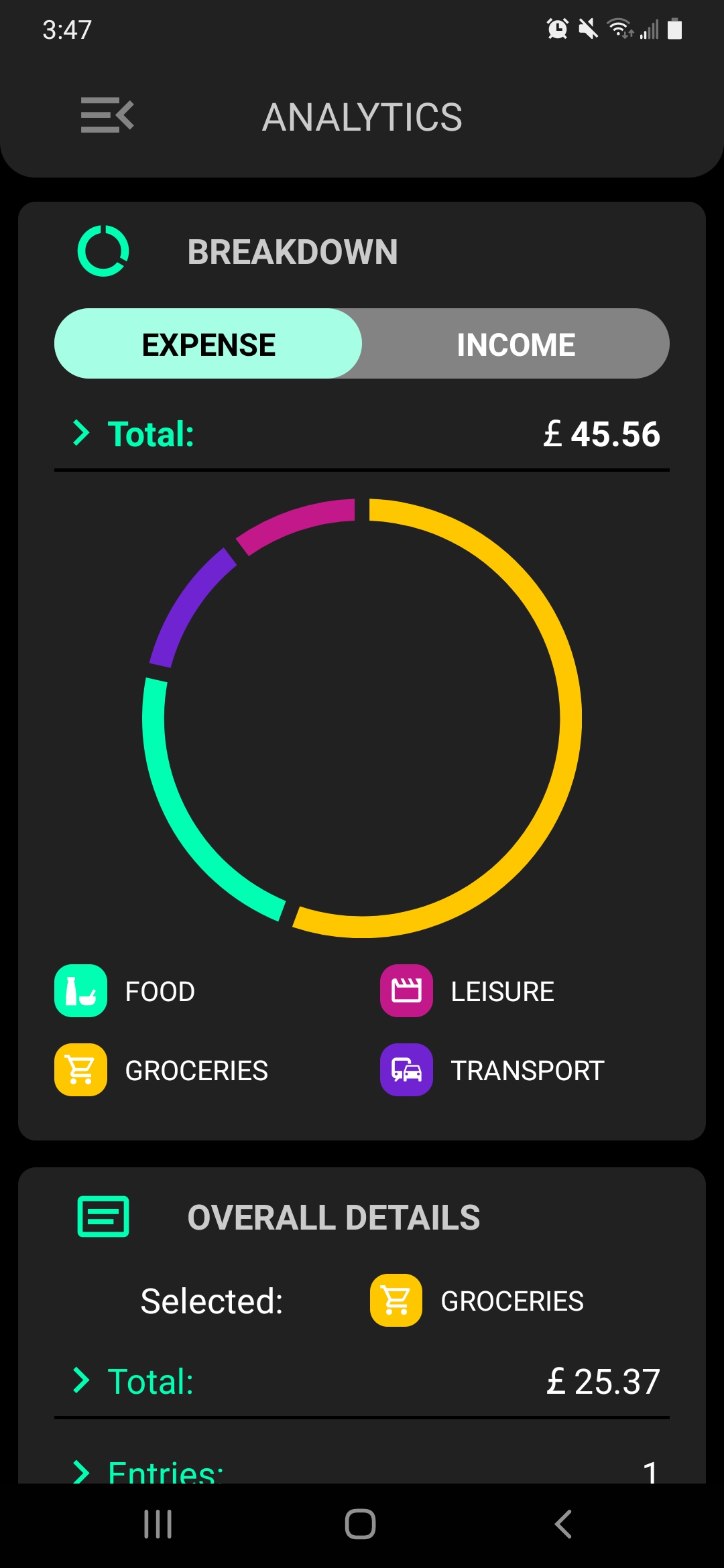
Fig. 1 — Analytics screen — proportion pie chart of spending by category, category sums, total sum, and spending goal progress.
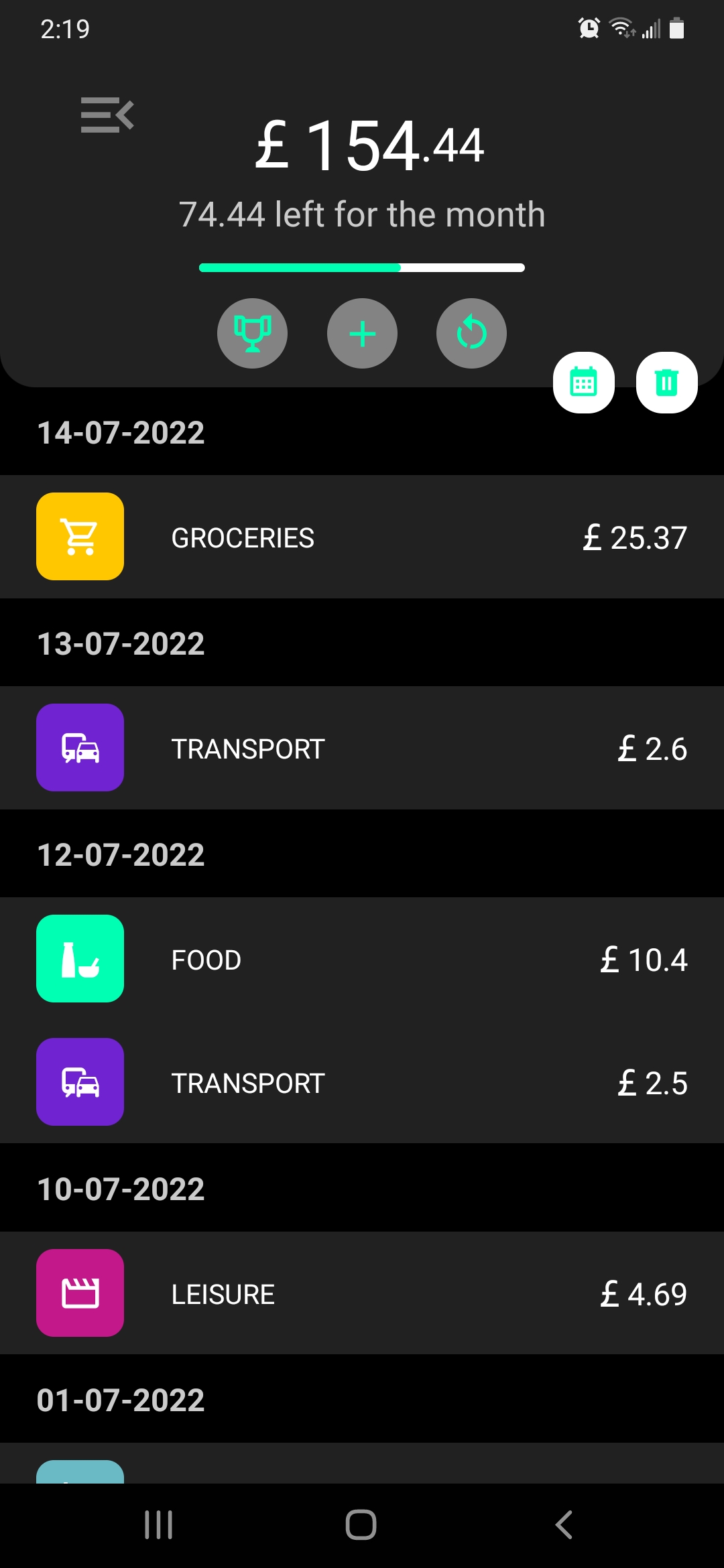
Fig. 2 — Home screen — records listed by category with custom icons and colours.
Challenges
Building a personal finance app involves a few non-obvious engineering challenges — particularly around data consistency, offline reliability, and making sure customisation feels fast rather than complicated.
When a user makes changes on two devices while offline, naively overwriting with the cloud copy or the local copy both risk data loss. The three-mode sync strategy — select latest (compare timestamps), cloud overwrite, local overwrite — gives users explicit control over which version wins, avoiding silent data loss while remaining simple enough to understand in a consumer mobile context.
The app must feel fully functional without an account or internet connection, but seamlessly extend to cloud sync when an account is present. Keeping local and remote storage in sync required a clear separation between the local persistence layer and the Firebase layer, with sync treated as an explicit user-triggered action rather than a background process that could create conflicting state.
Replacing the native numeric keyboard with a built-in calculator required building a lightweight expression parser that evaluates arithmetic in real time, handles operator precedence, and resolves to a final amount on confirmation — while feeling as fast and tactile as the system keyboard on both iOS and Android.
What's Next
The app is feature-complete in its current mobile form. The primary planned extension is a companion web application.